



.svg)


.svg)
.svg)
.svg)
.svg)

%201.svg)
.png)
Dotloop + Follow Up Boss: A unified lead-to-close workflow
The Dotloop and FUB automation keeps agents, admins, and ops teams aligned - contacts, loop activity, and deal details flow instantly and accurately. No more double entry, missed updates, or manual reconciliation - just a clean, consistent end-to-end transaction workflow.
Dotloop + Follow Up Boss: A unified lead-to-close workflow
The Dotloop and FUB automation keeps agents, admins, and ops teams aligned - contacts, loop activity, and deal details flow instantly and accurately. No more double entry, missed updates, or manual reconciliation - just a clean, consistent end-to-end transaction workflow.
.svg)
Dotloop + Follow Up Boss: A unified lead-to-close workflow
The Dotloop and FUB automation keeps agents, admins, and ops teams aligned - contacts, loop activity, and deal details flow instantly and accurately. No more double entry, missed updates, or manual reconciliation - just a clean, consistent end-to-end transaction workflow.
Trusted by more top teams than any other CRM
Dotloop + Follow Up Boss: A unified lead-to-close workflow
The Dotloop and FUB automation keeps agents, admins, and ops teams aligned - contacts, loop activity, and deal details flow instantly and accurately. No more double entry, missed updates, or manual reconciliation - just a clean, consistent end-to-end transaction workflow.
Dotloop + Follow Up Boss: A unified lead-to-close workflow
The Dotloop and FUB automation keeps agents, admins, and ops teams aligned - contacts, loop activity, and deal details flow instantly and accurately. No more double entry, missed updates, or manual reconciliation - just a clean, consistent end-to-end transaction workflow.
Dotloop + Follow Up Boss: A unified lead-to-close workflow
The Dotloop and FUB automation keeps agents, admins, and ops teams aligned - contacts, loop activity, and deal details flow instantly and accurately. No more double entry, missed updates, or manual reconciliation - just a clean, consistent end-to-end transaction workflow.
Dotloop + Follow Up Boss: A unified lead-to-close workflow
The Dotloop and FUB automation keeps agents, admins, and ops teams aligned - contacts, loop activity, and deal details flow instantly and accurately. No more double entry, missed updates, or manual reconciliation - just a clean, consistent end-to-end transaction workflow.

.png)
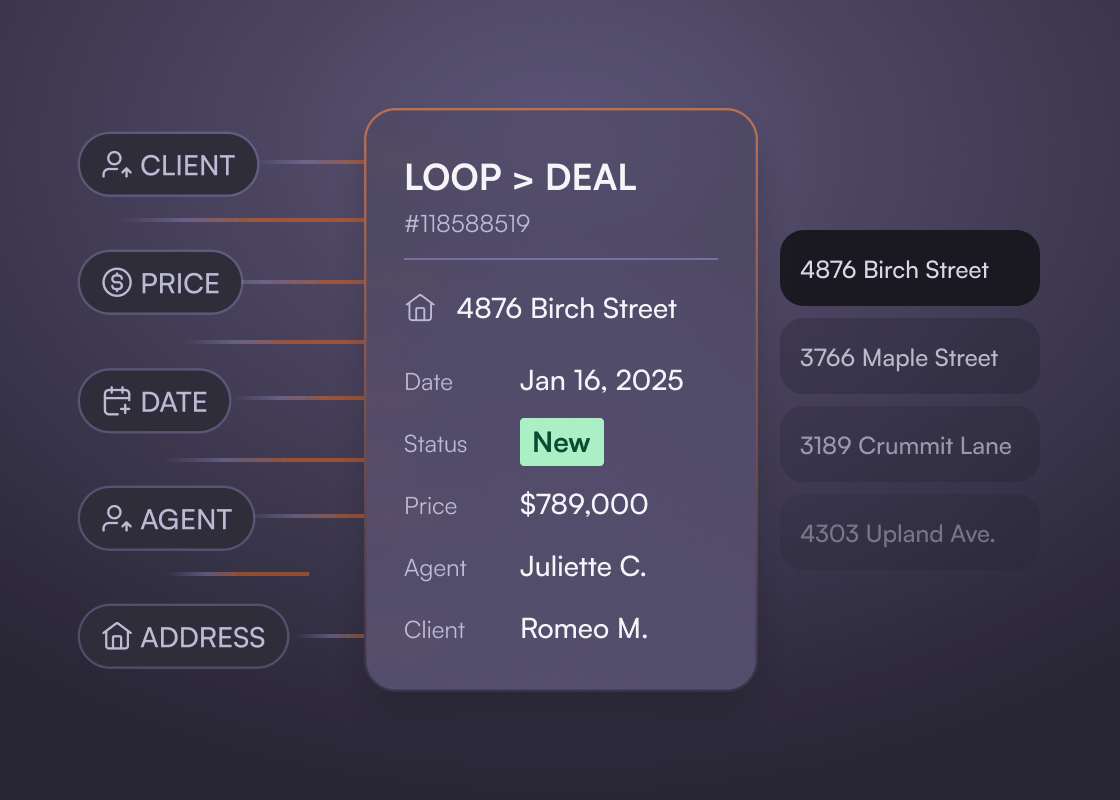
Loop →deal creation & continuous sync
Turn Dotloop loops into structured deals inside Follow Up Boss Deal Pipeline automatically and accurately keep it in sync.
How it works:
- When a loop is created or moves into key stages (e.g., “Under Contract”), Follow Up Boss automatically creates a corresponding deal.
- The loop is assigned into the correct Follow Up Pipeline and Stage.
- The integration syncs relevant loop information such as property address, price, commission, and closing date.
Loop →deal creation & continuous sync
Turn Dotloop loops into structured deals inside Follow Up Boss Deal Pipeline automatically and accurately keep it in sync.
How it works:
- When a loop is created or moves into key stages (e.g., “Under Contract”), Follow Up Boss automatically creates a corresponding deal.
- The loop is assigned into the correct Follow Up Pipeline and Stage.
- The integration syncs relevant loop information such as property address, price, commission, and closing date.
.svg)
Loop →deal creation & continuous sync
Turn Dotloop loops into structured deals inside Follow Up Boss Deal Pipeline automatically and accurately keep it in sync.
How it works:
- When a loop is created or moves into key stages (e.g., “Under Contract”), Follow Up Boss automatically creates a corresponding deal.
- The loop is assigned into the correct Follow Up Pipeline and Stage.
- The integration syncs relevant loop information such as property address, price, commission, and closing date.
Trusted by more top teams than any other CRM
Loop →deal creation & continuous sync
Turn Dotloop loops into structured deals inside Follow Up Boss Deal Pipeline automatically and accurately keep it in sync.
How it works:
- When a loop is created or moves into key stages (e.g., “Under Contract”), Follow Up Boss automatically creates a corresponding deal.
- The loop is assigned into the correct Follow Up Pipeline and Stage.
- The integration syncs relevant loop information such as property address, price, commission, and closing date.
Loop →deal creation & continuous sync
Turn Dotloop loops into structured deals inside Follow Up Boss Deal Pipeline automatically and accurately keep it in sync.
How it works:
- When a loop is created or moves into key stages (e.g., “Under Contract”), Follow Up Boss automatically creates a corresponding deal.
- The loop is assigned into the correct Follow Up Pipeline and Stage.
- The integration syncs relevant loop information such as property address, price, commission, and closing date.
Loop →deal creation & continuous sync
Turn Dotloop loops into structured deals inside Follow Up Boss Deal Pipeline automatically and accurately keep it in sync.
How it works:
- When a loop is created or moves into key stages (e.g., “Under Contract”), Follow Up Boss automatically creates a corresponding deal.
- The loop is assigned into the correct Follow Up Pipeline and Stage.
- The integration syncs relevant loop information such as property address, price, commission, and closing date.
Loop →deal creation & continuous sync
Turn Dotloop loops into structured deals inside Follow Up Boss Deal Pipeline automatically and accurately keep it in sync.
How it works:
- When a loop is created or moves into key stages (e.g., “Under Contract”), Follow Up Boss automatically creates a corresponding deal.
- The loop is assigned into the correct Follow Up Pipeline and Stage.
- The integration syncs relevant loop information such as property address, price, commission, and closing date.
.png)
Automated Two-Way Contact Sync
Ensure every participant - buyers, sellers, cooperating agents, vendors - stays perfectly aligned between Dotloop and Follow Up Boss.
How it works:
- New contacts created in Dotloop sync automatically to Follow Up Boss.
- Updates to names, phone numbers, and email addresses flow in both directions.
- Contact matching uses email → phone → name logic to eliminate duplicates.
- Tags and lead source metadata in Follow Up boss can be maintained or enhanced as contacts sync.
Automated Two-Way Contact Sync
Ensure every participant - buyers, sellers, cooperating agents, vendors - stays perfectly aligned between Dotloop and Follow Up Boss.
How it works:
- New contacts created in Dotloop sync automatically to Follow Up Boss.
- Updates to names, phone numbers, and email addresses flow in both directions.
- Contact matching uses email → phone → name logic to eliminate duplicates.
- Tags and lead source metadata in Follow Up boss can be maintained or enhanced as contacts sync.

Automated Two-Way Contact Sync
Ensure every participant - buyers, sellers, cooperating agents, vendors - stays perfectly aligned between Dotloop and Follow Up Boss.
How it works:
- New contacts created in Dotloop sync automatically to Follow Up Boss.
- Updates to names, phone numbers, and email addresses flow in both directions.
- Contact matching uses email → phone → name logic to eliminate duplicates.
- Tags and lead source metadata in Follow Up boss can be maintained or enhanced as contacts sync.
Trusted by more top teams than any other CRM
Automated Two-Way Contact Sync
Ensure every participant - buyers, sellers, cooperating agents, vendors - stays perfectly aligned between Dotloop and Follow Up Boss.
How it works:
- New contacts created in Dotloop sync automatically to Follow Up Boss.
- Updates to names, phone numbers, and email addresses flow in both directions.
- Contact matching uses email → phone → name logic to eliminate duplicates.
- Tags and lead source metadata in Follow Up boss can be maintained or enhanced as contacts sync.
Automated Two-Way Contact Sync
Ensure every participant - buyers, sellers, cooperating agents, vendors - stays perfectly aligned between Dotloop and Follow Up Boss.
How it works:
- New contacts created in Dotloop sync automatically to Follow Up Boss.
- Updates to names, phone numbers, and email addresses flow in both directions.
- Contact matching uses email → phone → name logic to eliminate duplicates.
- Tags and lead source metadata in Follow Up boss can be maintained or enhanced as contacts sync.
Automated Two-Way Contact Sync
Ensure every participant - buyers, sellers, cooperating agents, vendors - stays perfectly aligned between Dotloop and Follow Up Boss.
How it works:
- New contacts created in Dotloop sync automatically to Follow Up Boss.
- Updates to names, phone numbers, and email addresses flow in both directions.
- Contact matching uses email → phone → name logic to eliminate duplicates.
- Tags and lead source metadata in Follow Up boss can be maintained or enhanced as contacts sync.
Automated Two-Way Contact Sync
Ensure every participant - buyers, sellers, cooperating agents, vendors - stays perfectly aligned between Dotloop and Follow Up Boss.
How it works:
- New contacts created in Dotloop sync automatically to Follow Up Boss.
- Updates to names, phone numbers, and email addresses flow in both directions.
- Contact matching uses email → phone → name logic to eliminate duplicates.
- Tags and lead source metadata in Follow Up boss can be maintained or enhanced as contacts sync.
Activity, notes & status alignment
Keep teams aligned with automatic status mapping and activity logging across both platforms.
How it works:
- Critical loop activity (status changes, negotiation notes, contract milestones) can be logged to the Follow Up Boss timeline.
- Stage mapping aligns Dotloop loop phases with FUB deal stages (e.g., Listing → Under Contract → Pending → Closed).
Activity, notes & status alignment
Keep teams aligned with automatic status mapping and activity logging across both platforms.
How it works:
- Critical loop activity (status changes, negotiation notes, contract milestones) can be logged to the Follow Up Boss timeline.
- Stage mapping aligns Dotloop loop phases with FUB deal stages (e.g., Listing → Under Contract → Pending → Closed).
Activity, notes & status alignment
Keep teams aligned with automatic status mapping and activity logging across both platforms.
How it works:
- Critical loop activity (status changes, negotiation notes, contract milestones) can be logged to the Follow Up Boss timeline.
- Stage mapping aligns Dotloop loop phases with FUB deal stages (e.g., Listing → Under Contract → Pending → Closed).
Trusted by more top teams than any other CRM
Activity, notes & status alignment
Keep teams aligned with automatic status mapping and activity logging across both platforms.
How it works:
- Critical loop activity (status changes, negotiation notes, contract milestones) can be logged to the Follow Up Boss timeline.
- Stage mapping aligns Dotloop loop phases with FUB deal stages (e.g., Listing → Under Contract → Pending → Closed).
Activity, notes & status alignment
Keep teams aligned with automatic status mapping and activity logging across both platforms.
How it works:
- Critical loop activity (status changes, negotiation notes, contract milestones) can be logged to the Follow Up Boss timeline.
- Stage mapping aligns Dotloop loop phases with FUB deal stages (e.g., Listing → Under Contract → Pending → Closed).
Activity, notes & status alignment
Keep teams aligned with automatic status mapping and activity logging across both platforms.
How it works:
- Critical loop activity (status changes, negotiation notes, contract milestones) can be logged to the Follow Up Boss timeline.
- Stage mapping aligns Dotloop loop phases with FUB deal stages (e.g., Listing → Under Contract → Pending → Closed).
Activity, notes & status alignment
Keep teams aligned with automatic status mapping and activity logging across both platforms.
How it works:
- Critical loop activity (status changes, negotiation notes, contract milestones) can be logged to the Follow Up Boss timeline.
- Stage mapping aligns Dotloop loop phases with FUB deal stages (e.g., Listing → Under Contract → Pending → Closed).
Connect Follow Up Boss and Dotloop
Ready to eliminate double entry, keep deals and contacts in sync, and give your team real-time visibility from contract to close?
To learn more about capabilities, implementation, and pricing, reach out to the API Nation team to discuss your needs.
Connect Follow Up Boss and Dotloop
Ready to eliminate double entry, keep deals and contacts in sync, and give your team real-time visibility from contract to close?
To learn more about capabilities, implementation, and pricing, reach out to the API Nation team to discuss your needs.
Connect Follow Up Boss and Dotloop
Ready to eliminate double entry, keep deals and contacts in sync, and give your team real-time visibility from contract to close?
To learn more about capabilities, implementation, and pricing, reach out to the API Nation team to discuss your needs.
Trusted by more top teams than any other CRM
Connect Follow Up Boss and Dotloop
Ready to eliminate double entry, keep deals and contacts in sync, and give your team real-time visibility from contract to close?
To learn more about capabilities, implementation, and pricing, reach out to the API Nation team to discuss your needs.
Connect Follow Up Boss and Dotloop
Ready to eliminate double entry, keep deals and contacts in sync, and give your team real-time visibility from contract to close?
To learn more about capabilities, implementation, and pricing, reach out to the API Nation team to discuss your needs.
Connect Follow Up Boss and Dotloop
Ready to eliminate double entry, keep deals and contacts in sync, and give your team real-time visibility from contract to close?
To learn more about capabilities, implementation, and pricing, reach out to the API Nation team to discuss your needs.
Connect Follow Up Boss and Dotloop
Ready to eliminate double entry, keep deals and contacts in sync, and give your team real-time visibility from contract to close?
To learn more about capabilities, implementation, and pricing, reach out to the API Nation team to discuss your needs.
.jpeg)