



.svg)


.svg)
.svg)
.svg)
.svg)
.png)

There’s no denying it. Artificial intelligence is reshaping real estate marketing and operations. And teams are approaching it with a mix of excitement and caution.
But most agree on one thing: AI in real estate should be people-based and machine-enhanced. Not a full replacement for agents.
In our conversations with real estate leaders, we're seeing teams focus on practical integration, while ruthlessly protecting what humans do best. For real estate businesses and brokerages, that means clear handoffs, data‑driven decision‑making, and client communications that stay personal.
This guide curates seven practical, high‑impact use cases to help your team use the right AI tools the right way.
BONUS: Watch this Team OS episode on leveraging AI, automations, and tech tools without losing sight of your client goals
How real estate teams are using AI to make a bigger impact with leads
Harnessing the potential of AI in real estate is about more than just using generative AI tools like ChatGPT to speed up content creation, social media posts, and listing descriptions.
Here's how teams are seeing real impact with AI.
1. Speed‑to‑lead with AI text/voice on new/cold leads
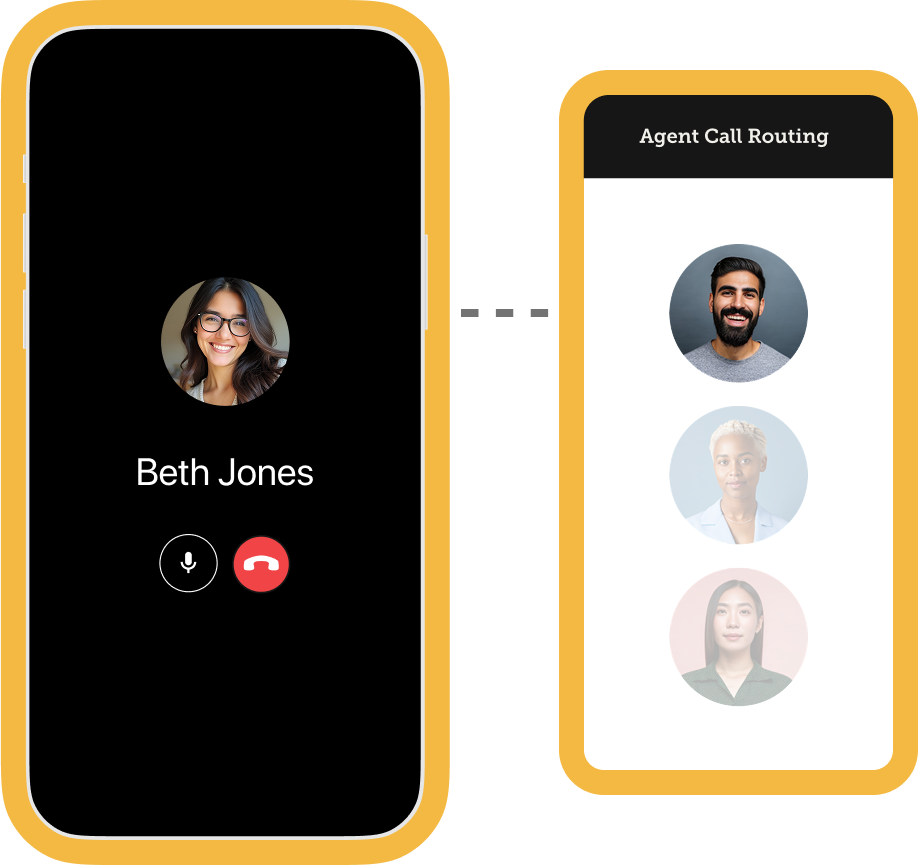
Use AI to make first contact fast, then hand off immediately when a human is needed. This protects speed while keeping rapport human‑led.
“The AI is kind of teeing up these opportunities and then we're jumping in and taking it across the goal line,” explains Matt Croteau, team leader with The Fernandez Group.
Here’s how to strike the right balance:
- Tee up with AI: Use AI agents or chatbots for initial outreach and routine follow‑ups (text/voice), plus behavior‑based nudges for lead generation and lead nurturing.
- Pass to a human agent: For all things rapport, strategy, negotiation, and personalized guidance. When intent shows up, a human takes over.
- Keep it clear: “You were texting my assistant; I’m your agent.” Disable AI for Warm/Hot/Active clients.
Enable assistant outreach for new online registrations and turn AI voice agents off for warm and hot leads to keep the convo organic and ensure natural language replies.
Set up your CRM to alert agents with real‑time notifications on engagement and transfer immediately based on intent. Use templates to keep follow‑ups consistent.
{{cta-white}}
2. Behavioral follow‑ups that drive site return
When behavior signals interest, respond with tailored content that routes people back to listings they actually care about—highlight property listings, virtual tours, and visuals pulled from your MLS feed.
Start with these simple steps":
- Create a Smart List for “viewed same home 3x” and auto‑add follow up tasks based on property search behavior
- Use subject lines tied to behavior: “Still interested in 123 Oak? Here are 5 similar options” Include price ranges and market data
- Track click‑through and site return in CRM to measure lift and conversion rates
You can also use the “Last Five Preview” merge field to insert clickable recent listings that route right back to your site.
3. “Bad phone” recovery
Bad numbers stall pipelines. Automate the recovery process and route re‑engagement to agents fast so teams spend less time on admin and more time selling.
Stage change applies a tag, sends a number‑update email, and prompts the site to collect a new phone number on next visit.
These tips can help you get set up:
- Use clear copy: “We couldn’t reach you—reply here to update your number”
- Add a one‑click update link tied to the contact record
- Alert the assigned agent the moment a new number is captured to enable real‑time callbacks
Set up your lead management system to flag “bad phone” in tags. When a fresh number is added, the ISA calls within 15 minutes and logs the outcome. This gives you the best chance of boosting recovery rates, without manual hunting.
4. Appointment‑triggered tasks
After a consult is set, autopilot the routine touches so agents can focus on prep and strategy.
“I don't want the agent worrying about creating the list of who they would need to speak to. I want them having the conversations and spending the time on the human element part,” says Emily Smith, Head of Operations at Wemert Group Realty.
Here’s what to include:
- Send a confirmation with calendar invite and location details
- Deliver a tailored prep packet based on buyer vs seller
- Queue post‑appointment tasks: recap, next steps, docs request
- Turn off AI voice/text once relationship is established (Warm/Hot)
Consistency wins appointments. Use automations to keep your team from dropping balls so the consult can be all about offering authentic connection and advice.
For the AI-bullish agents at Wemert, that could even mean using AI to record and transcribe listing appointments (with permission of course!), then use ChatGPT to analyze personality profiles based on the conversation.
5. Coaching with call recordings, transcripts, and summaries
Use recordings to review handoffs and discovery. AI helps team leaders dive deeper using real transcripts and call summaries to improve client communications and content creation.
With the ability to help agents spot missed questions and opportunities, you can keep your coaching grounded in real scenarios with potential clients.
Here’s how to integrate AI into your sales training:
- Spot‑check weekly: 3 calls per agent focused on handoff quality
- Tag moments: intent detected, empathy wins, missed questions
- Build a “Top 10 objections” library with best responses
- Use summaries to assign next‑step tasks in CRM
Review AI‑assisted calls every week. Highlight strong handoffs and coach tone where transcripts miss sentiment. Ensure all AI‑generated messages remain in natural language.
{{cta-blue}}
6. Drafting context-driven follow ups
Train AI on your database so responses feel on‑brand and actionable.
You can do this by building a custom GPT or using the AI built into your CRM. The key is make sure it’s trained on your team’s actual scripts and return responses.
Train your AI to speak like you do:
- Upload your best scripts and past email replies
- Structure outputs: response, CTA, follow‑up cadence, personalization tokens and FAQs
- Encourage agents to edit—never copy‑paste blind
The key to not sounding like a robot is feeding your AI the right context so that outputs match your voice.
Taylor Hack, Owner of Hack&Co, uses prompts like "write an email in my voice” and uses AI to add a quick local fun fact at the end of the email or highlight a glowing agent review to add a friendly, authoritative touch to every email without reinventing the wheel.
7. Content assist: comps and “deals of the week”
A simple way to free up time with AI is to offload routine content drafts—market comps, weekly deal roundups—so agents can spend time curating, not starting from scratch.
Start here:
- Create a scheduled AI task: draft comps for active buyers every Thursday
- Pull 5–7 properties that match criteria and add quick takes and CTAs
- Review for local nuance (schools, HOA quirks, days‑on‑market context)
- Send from the agent with a personal note
For solo agents like Nick Nelson with eXp Realty and teams like Pozek Group, plugging MLS data into ChatGPT is a huge win for quick market overviews.
“It'll give you a real quick, easy analytical overview of the high points that you need to take into an appointment so that you're the expert. And yeah, you know it, but now you can also eloquently say it,” says Bree Tucker of Pozek Group.
Streamline your system to keep up with market trends
Define the lanes for people and machines, train AI on your voice, and watch for authenticity gaps. Culture and governance matter as much as tools.
- Use stages, Smart Lists, and cadences to target where AI engages (new/cold) and where it’s off (warm/hot/active).
- Automate behavioral triggers (e.g., “viewed same home 3x”), appointment follow‑ups, and “bad phone” recovery.
- Enable AI text/voice for prospecting and nurture, with instant alerts and live‑transfer rules for human takeover.
- Capture context with notes, custom fields, and tags (e.g., AI on/off, handoff needed, intent detected).
- Coach with call recordings, transcripts, and summaries; track outcomes with reporting on AI‑assisted conversions.
AI-powered follow up right where you need it
Put AI where speed and repetition matter; keep humans where trust, nuance, and strategy win. Use clear lanes, tight handoffs, and weekly coaching to improve outcomes without sacrificing relationships.
Teams testing this see leverage without losing the human edge.
Download the AI readiness checklist to benchmark your program, or try Follow Up Boss free for 14 days to pilot these use cases.
{{cta-yellow}}
FAQs
How should real estate agent use an AI assistant without risking trust?
Use an AI assistant (or virtual assistants) for first contact, scheduling, and real-time triage, then hand off quickly when intent appears. Keep building relationships and advice human-led; treat AI as support, not a replacement.
Can AI help with valuation and CMAs?
Yes—AI can surface data-driven market insights, market analysis, and comparable data to inform CMAs. But valuation decisions should always be reviewed by a professional agent for local nuance and better decision-making.
Use predictive analytics and light forecasting as inputs, not verdicts.
How does AI-driven lead scoring improve follow up?
AI-driven lead scoring with tools like MaverickRE can help teams prioritize high-intent contacts in real-time, so agents can respond faster across home-buying journeys.
.webp)
.png)
%20(1).png)
.png)